Please wait..
Passport OCR
This OCR passport scanner to extract details from passports accurately without sign up.
 Safe & Secure
 Fast Processing
 AI-Powered OCR
 Batch Processing
Working with industry leaders
We’re a proud partner of these globallyrecognized brands


How to Use this OCR Passport Scanner?
Here are some steps to convert passport images into editable text using this passport OCR scanner.

Features of this Passport OCR Tool:
This passport OCR tool comes with features designed to make passport data extraction simple and efficient.

Global Coverage

Safe & Auto-Deletions:

Multi-Lingual OCR:

Batch Processing:

Freemium Source:

Ready to Use Data:
What Fields Are Extracted with this Online Passport OCR Tool?
Here are the essential passport details our tool automatically extracts:
Online Passport OCR for All Passport Types
Our OCR passport scanner supports different types of passports issued worldwide, including:Checklist Item 2Checklist Item 4Checklist Item 6Checklist Item 8Checklist Item 10
-
 Ordinary (Regular/Tourist) Passport
-
Diplomatic Passport
-
Official (Service) Passport
-
Emergency Passport (Travel Document)
-
e-Passport (Biometric Passport)
-
Machine-Readable Passport (MRP)

Who Can Use This Passport Scanner?
Travelers:
Quickly save your passport details for visa forms, hotel check-ins, or travel insurance without manual typing.
Visa Processors:
Speed up visa applications by extracting applicant details accurately, reducing errors and processing time.
Airlines & Travel Agencies:
Quickly check in passengers and
keep accurate records for bookings, ticketing, and compliance.
Government and Immigration Offices:
Verify traveler identities at borders
and process documents quickly
during high-volume checks
Banks and Financial Institutions:
Simplify KYC and identity verification when onboarding customers or opening new accounts.
International Businesses:
Easily collect and organize passport details for global employees, remote staff, and overseas clients.
Input Formats Accepted
| Format | Extension | Best For |
|---|---|---|
| JPEG / JPG | .jpg, .jpeg | Smartphone photos, live camera captures, and standard passport photo uploads |
| PNG | .png | High-resolution passport scans, clear screenshots, and digital passport exports |
| GIF | .gif | Static (non-animated) passport photos and basic web captures |
| BMP | .bmp | Uncompressed flatbed scanner outputs and high-detail passport document files |
| Scanned e-passports, official travel document files, and multi-page travel records | ||
| WebP | .webp | Compressed web photos and fast mobile passport uploads |
| Format | Extension |
|---|---|
| JPEG / JPG | .jpg, .jpeg |
| PNG | .png |
| GIF | .gif |
| BMP | .bmp |
| WebP | .webp |
| Best For |
|---|
| Smartphone photos, live camera captures, and standard passport photo uploads |
| High-resolution passport scans, clear screenshots, and digital passport exports |
| Static (non-animated) passport photos and basic web captures |
| Uncompressed flatbed scanner outputs and high-detail passport document files |
| Scanned e-passports, official travel document files, and multi-page travel records |
| Compressed web photos and fast mobile passport uploads |
Output Formats Available
| Format | Extension | Best For |
|---|---|---|
| Microsoft Excel | .xlsx | Traveler registries, organized passport databases, and bulk record-keeping |
| CSV | .csv | Importing passenger lists, auto-filling hotel or flight bookings, and eKYC database sync |
| Format | Extension |
|---|---|
| Microsoft Excel | .xlsx |
| CSV | .csv |
| Best For |
|---|
| Traveler registries, organized passport databases, and bulk record-keeping |
| Importing passenger lists, auto-filling hotel or flight bookings, and eKYC database sync |
Your Image vs Output Result
See how your passport image is transformed into passport data.
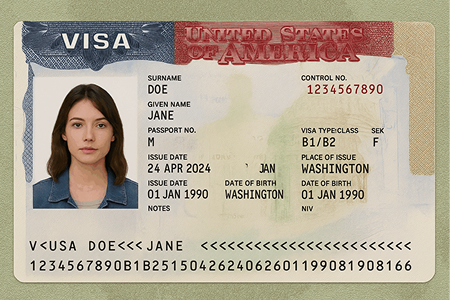
Before
This is your unprocessed raw passport image/PDF
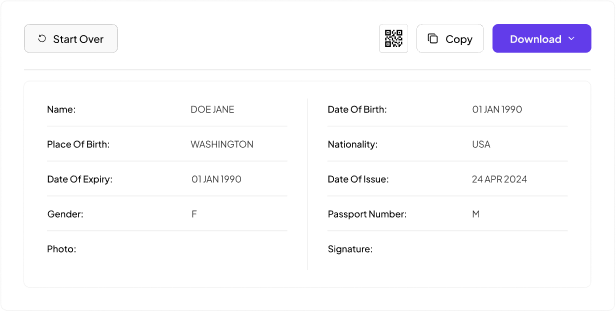
After Conversion
Here is processed information after conversion
People Also Ask
Passport OCR is a tool that reads text from passport images and converts it into digital, editable data. It helps extract details such as the name, passport number, date of birth, and other visible information so you don’t have to type it out manually.
You can upload all standard image and document formats, such as JPG, JPEG, PNG, BMP, GIF, WEBP, and PDF. Make sure the image is clear and the passport details are visible.
No, your data is completely safe with us. To protect your privacy, all uploaded files and extracted details are automatically and permanently deleted from our servers right after processing.
Yes. This tool easily scans and decodes the MRZ (Machine Readable Zone) at the bottom of the passport to extract all personal and document details accurately.
It is widely used by airlines for fast passenger check-ins, hotels for guest registration, banks for identity verification (KYC), and travel agencies for quick visa processing.
Yes. The OCR tool simply reads the text printed on the document. It will successfully extract the data from an expired passport exactly the same way it reads a valid one.
Absolutely. You can take a clear picture of your passport with your smartphone camera and upload that image directly to the tool for instant data extraction. No physical scanner is required. Keep the passport flat, well-lit, and fully visible for better text recognition.
Yes, our AI-powered OCR can read slightly blurred or dark images. To get the most accurate results, it is always recommended to upload a clear, well-lit image without any camera glare or flash covering the text.
Yes. Our tool features global coverage and accurately extracts data from official passports issued by almost any country, supporting multiple languages and international formats.


 Unlock Multiple